Update language toggle
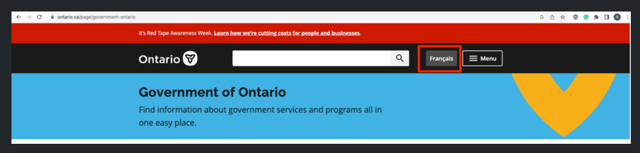
Digital Agent will follow the government standards in making the English and French website toggle available. On the English Website the link will read “Français”
Example Site
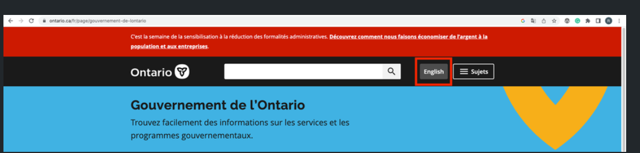
On the french French website the link will read “English”
Example site
Enhanced Libraries Capabilities
To provide Marketing Professionals with additional access to information that can be used for reference in content creation. An enhancement to the Digital Agent CSS libraries will make the following fields available on the team profile.
Phone Number
Cell Number
Fax Number
Toll Free Number
SSO Session Termination Enhancement
For clients that are using SSO (Single Sign-on), an enhancement to address the session termination when a user “Logs Out” has been included. Through some testing a use case was discovered that didn’t terminate the session properly after a user clicked “Log Out”. The session was active until it was terminated due to inactive time. This enhancement will terminate the session upcon “Log Out” and will need to be tested that current functionality will not break. This will require SSO enablement in the UAT environment to confirm that no unwarranted issues appear in production.
Note: Local Digital Agent authentication was grandfathered and the going forward approach to foall clients is to implement SSO with Digital Agent.
Hearsay Social Compressed images
For clients that are using the Hearsay integration that sources content from Social activities and posts it onto the Veriday Website. The process that sources content has been enhanced to address websites that used compressed images. The compressed images are now part of the content when the material is created in Digital Agent. Before this enhancement compressed images could not be imported into Digital Agent from external websites provided by the Hearsay Social connector.
Extending External URL values
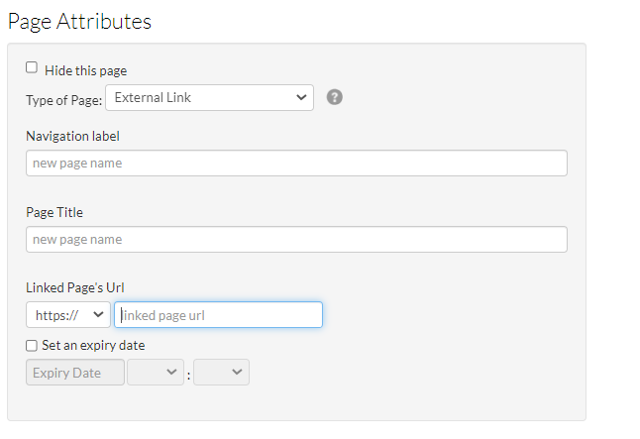
The “@” symbol has been added to the validation process for external URL’s and will be allowed to be part of the URL going forward.
List of all special characters (each is separated by a comma (,)) that are accepted
! , @ , # , $ , % , ^ , & , * , ( , ) , - , _ , = , + , ~ , ` , [ , { , ] , } , \ , | , ; , : , ' , “ , < , > , . , / , ?
From Digital Workspace > Settings > Add Page > External Link
Custom Lead API Integration
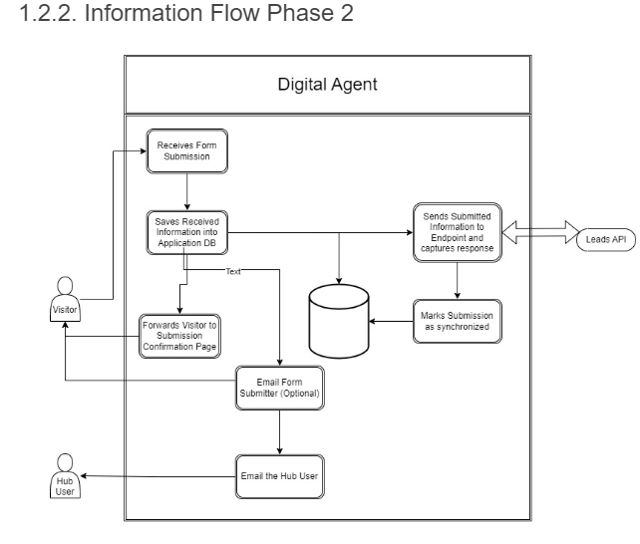
Digital Agent offers an in-app feature called Digital Agent Forms, that allow users to create, consume and customize web forms to collect visitors information. These forms can be added to any page of an advisor’s website and all data collected through forms is safely stored in the application, where it can be revisited and downloaded later. Digital Agent also offers metrics and usage statistics of DA Forms in its Dashboard module.
A Marketing Pre-approved form is integrated with a customer custom Lead API so that the visitor information can directly be stored in Salesforce and can be managed and nurtured.
GA4 Advisor Dashboards
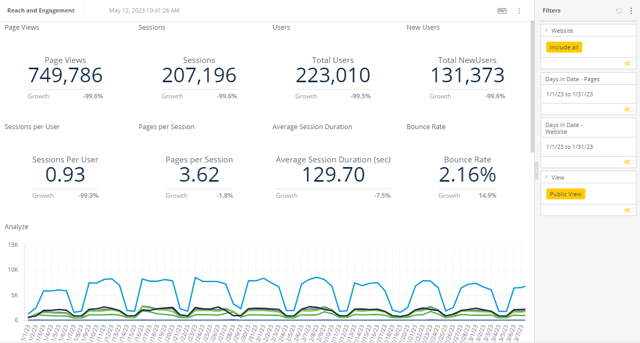
The Digital Agent Dashboard 2.0 module has been converted to use GA4 (Google Analytics 4) to source analytical content for Advisors. The Dashboard 2.0 was released in 2021 and Dashboard was grandfathered at that time.
On 1st July 2023, standard Google Analytics will stop processing new hits on Universal Analytics (UA) . However, the read only data will remain available for use for 3 months. The grandfathered Dashboard module will continue to be available for 3 months after which it will be removed from the Digital Agent Workspace.
There is no impact or change to the presentation of information within Dashboard 2.0, it is the source of data that is being modified. Google does not provide a data migration path from UA to GA4, it is a conversion of the account to GA4 and a new start of collecting information. Data collection in GA4 started in Jan 2023 which will be accessible through Dashboard 2.0. For any historical information, data will continue to be available in the Enterprise Dashboard which is provided to Enterprise Marketing users that have access to all websites.
Privacy has been a big concern for consumers over the last few years and users' awareness of their privacy online has been increasing. The result of this has been changes in the law like GDPR in Europe and ITP. As we move into a cookieless world, Google has created GA4 with privacy front-of-mind. GA4 operates across platforms (web and app) and does not rely exclusively on cookies. It uses event-based data modeling for its measurement.
Enterprise Dashboard (Alpha)
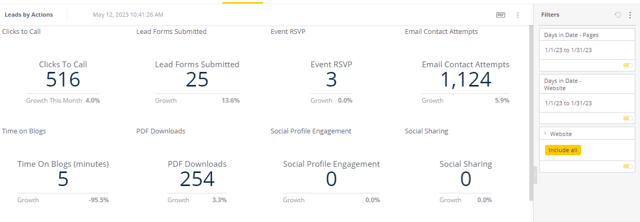
For customers still using the Datastudio Dashboard, this dashboard was grandfathered in 2022 and is being replaced by a new Enterprise Dashboard which is being rolled out to all clients. The Data Studio Dashboard will be decommissioned on May 29, 2023. With GA4 migration successfully completed, there are plans to introduce new capabilities in the Enterprise Dashboard in the second half of 2023..
For any questions on access or utilization please contact your client rep. There are recorded training modules that can be made available on request.
Sample of a “Reach and Engagement”
Sample of a “Leads by Action”
TLS upgrade 1.2 +
Transport Layer Security (TLS) encrypts data sent over the Internet to ensure that eavesdroppers and hackers are unable to see what you transmit. This is particularly useful for private and sensitive information such as passwords and personal correspondence. This page explains what TLS is, how it works, and why you should deploy it.
Since all requests are directed to HTTPS, it is necessary for the client to request that the server set up a TLS connection. Once the client and server have agreed to use TLS, they negotiate a stateful connection by using a handshaking procedure. The protocols use a handshake with an asymmetric cipher to establish not only cipher settings but also a session-specific shared key with which further communication is encrypted using a symmetric cipher. During this handshake, the client and server agree on various parameters used to establish the connection's security.
Digital Agent will no longer accept requests that do not support TLS 1.2 or above and the client will be informed per the standards set by the browser and operating system. For reference, the link below provides insight into the TLS versions that the browsers support.
Version history for TLS/SSL support in web browsers
Note: There is no expectation that any client will be testing this upgrade as it requires technical knowledge around web browsers and sessions. It is transparent to the visitor on the website and any use of the Digital Agent application
Enhanced DDOS Protection
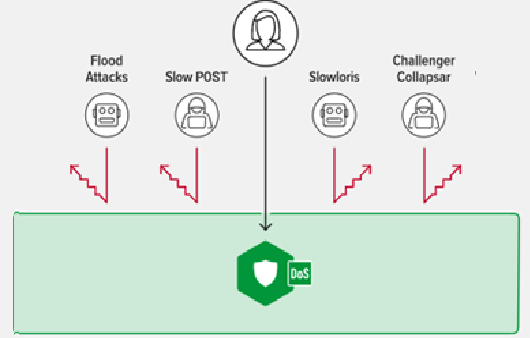
The Digital Agent environment has been enhanced to address key Distributed Denial of Service (DDOS) type of attacks. Security protection involves a multi-layer approach and the diagram below highlights the focus that the DOS module will provide.
Flood Attacks
An HTTP flood DDoS attack utilizes what appears to be legitimate HTTP GET or POST requests to attack a web server or application. These flooding DDoS attacks often rely on a botnet, which is a group of Internet-connected computers. These types of DDoS attacks are designed to cause the targeted server or application to allocate the most resources possible in direct response to each request. In this way, the attacker hopes to overwhelm the server or application, “flooding” it with as many process-intensive requests as possible.
Slow Post
In a Slow Post DDoS Attack, attackers establish a valid connection. The attacker first establishes a large number of valid sessions and then sends HTTP POST commands, specifying the number of bytes in the HTTP message body which will be sent to the server. The attacking machines will then start sending the contents of the message body at a very slow rate, often 1 byte at a time, consuming excess resources on the receiving server as each session will be blocked until all the contents of the message body have been delivered. Slow Post Attacks are always non-spoofed in order to hold sessions open for long periods of time.
Slowloris Attacks
Slowloris is an application layer DDoS attack which uses partial HTTP(S) requests to open connections and then keeping those connections open for as long as possible, thus overwhelming and slowing down the response. This type of DDoS attack requires minimal bandwidth to launch and only impacts the target web server, leaving other services and ports unaffected. Slowloris DDoS attacks can target many types of Web server software.
Challenger Collapsar
Challenge Collapsar (CC) attack is a type of DDoS attack that sends forged HTTP requests to some target web server frequently. These requests often require complicated time-consuming operations, in order to exhaust the resource of the target web server. Because the HTTP request packets of CC attack are standard and sometimes their IPs are true, it’s difficult to defend and requires enhanced specialized detection capabilities.
Enhanced Web Application Firewall
Attack signatures are rules or patterns that identify attack sequences or classes of attacks on a web application and its components. SQL Injection and Cross Site Scripting signatures prevention have been implemented in this enhancement. In addition HTTP protocol violation has been implemented to protect header based attacks that pass parameters in a malform manner in order to disrupt normal operations. File type preventions have also been implemented and since Digital Agent does not support PHP and asp content, any requests for these are now blocked from being processed.
Cipher Upgrade
A cipher is a cryptographic algorithm, a procedure used to encrypt and decrypt data. Modern ciphers operate by encrypting the original message, the plaintext, via the algorithm’s rules (i.e., the encryption key) to produce what’s known as ciphertext. The ciphertext contains all the information of the original plaintext message but appears as a random string of data. It cannot be read by anyone who doesn’t have the key.
Supported Ciphers
ECDHE-ECDSA-AES128-GCM-SHA256
ECDHE-ECDSA-AES256-GCM-SHA384
ECDHE-ECDSA-CHACHA20-POLY1305
ECDHE-RSA-AES128-GCM-SHA256
ECDHE-RSA-AES256-GCM-SHA384
ECDHE-RSA-CHACHA20-POLY1305
DHE-RSA-AES128-GCM-SHA256
DHE-RSA-AES256-GCM-SHA384
Website Header Update
The following 3 headers have been implemented for all Digital Agent requests which include the Websites and Application.
Content Security Policy (CSP)
HTTP Strict-Transport-Security
X-FRAME-OPTIONS
What is Content-Security-Policy and why / what has it been implemented?
Content-Security-Policy is the name of a HTTP response header that modern browsers use to enhance the security of the document (or web page). Content Security Policy (CSP) is an added layer of security that helps to detect and mitigate certain types of attacks, including Cross-Site Scripting (XSS) and data injection attacks. The Content-Security-Policy header allows the restriction for resources (such as JavaScript, CSS, Images, etc.) can be loaded, and the URLs that they can be loaded from. In this case Digital Agent has been set as the default.
What is Strict-Transport-Security and why / what has it been implemented?
The HTTP Strict-Transport-Security response header (often abbreviated as HSTS) informs browsers that the site should only be accessed using HTTPS, and that any future attempts to access it using HTTP should automatically be converted to HTTPS.
If a website accepts a connection through HTTP and redirects to HTTPS, visitors may initially communicate with the non-encrypted version of the site before being redirected, if, for example, the visitor types foo.com or even just foo.com . This creates an opportunity for a man-in-the-middle attack. The redirect could be exploited to direct visitors to a malicious site instead of the secure version of the original site.
The HTTP Strict Transport Security header informs the browser that it should never load a site using HTTP and should automatically convert all attempts to access the site using HTTP to HTTPS requests instead.
What is X-FRAME-OPTIONS and why / what has it been implemented?
This header is used to mitigate possible Clickjacking attempts. Clickjacking is an attack that fools users into thinking they are clicking on one thing when they are actually clicking on another. Its other name, user interface (UI) redressing, better describes what is going on. Users think they are using a web page’s normal UI, but in fact there is a hidden UI in control; in other words, the UI has been redressed. When users click something they think is safe, the hidden UI performs a different action. In order to mitigate clickjacking the X-Frame-Options header is used and is set to
SAMEORIGIN which allows the current page to be displayed in a frame on another page, but only within the current domain.
Was this article helpful?
That’s Great!
Thank you for your feedback
Sorry! We couldn't be helpful
Thank you for your feedback
Feedback sent
We appreciate your effort and will try to fix the article